Reduce Snowflake Costs – Cut Snowflake Spend by 30% in 90 Days Without Rewriting Your Stack
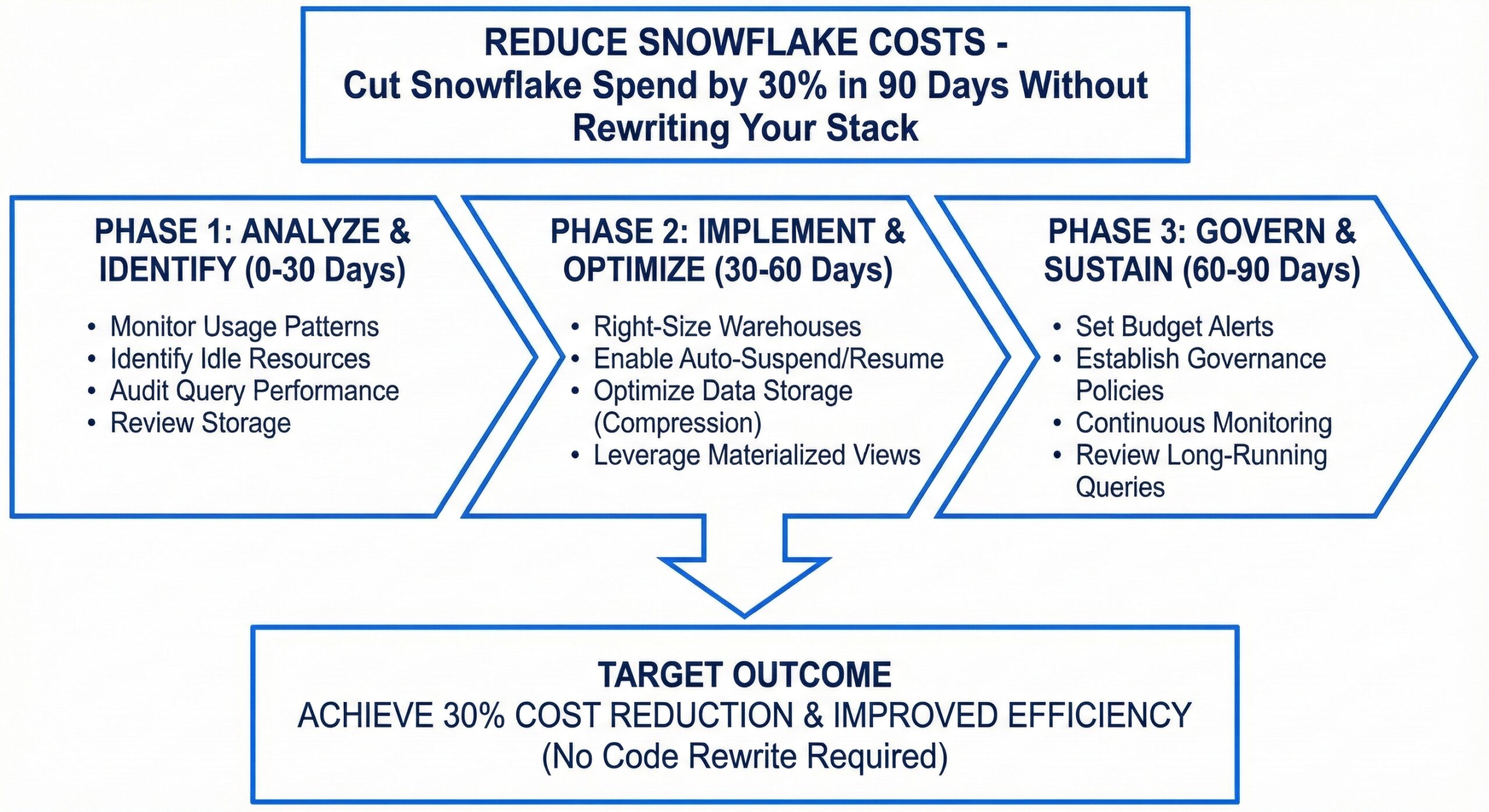
Snowflake has revolutionized how organizations manage and analyze data, offering unparalleled scalability, performance, and ease of use in the cloud. Its separation of storage and compute allows businesses to scale resources independently, making it ideal for handling massive datasets and complex analytics workloads. However, this flexibility comes with a significant caveat: unchecked usage can lead to rapidly escalating costs. Many organizations find themselves facing sticker shock when their monthly Snowflake bills arrive, often with no clear understanding of where the money is going. The good news is that you don’t need to abandon your existing architecture or undertake a massive rewrite to regain control. It is entirely possible to cut your Snowflake spend by 30% or more within just 90 days using strategic optimization techniques that work with your current stack.
Understanding the Snowflake Cost Model
Before diving into cost-cutting strategies, it’s essential to understand how Snowflake charges for its services. Snowflake’s pricing model is based on two primary components: compute and storage. Compute costs are incurred when virtual warehouses are running and processing queries, measured in credits consumed per hour. Storage costs are based on the amount of data stored in your Snowflake account, billed per terabyte per month. While storage is relatively inexpensive, compute costs can quickly spiral out of control if not managed properly.
Virtual warehouses are the workhorses of Snowflake, responsible for executing queries and processing data. You can size warehouses from X-Small to 4X-Large, with larger warehouses consuming more credits per hour but offering greater processing power. The key to cost efficiency lies in ensuring that your warehouses are appropriately sized for the workload and are not running unnecessarily. Idle warehouses continue to consume credits, making them a major source of wasted spend. Additionally, Snowflake offers features like multi-cluster warehouses for handling concurrent workloads and automatic suspension to prevent runaway costs, but these must be configured correctly to be effective.
Another critical aspect of Snowflake’s cost model is data transfer. While data transfer within the same cloud region is typically free, cross-region and cross-cloud transfers can incur additional charges. This is particularly relevant for organizations with a global footprint or those using multiple cloud providers. Understanding these cost drivers is the first step toward identifying optimization opportunities.
Right-Sizing Virtual Warehouses
One of the most impactful ways to reduce Snowflake costs is by right-sizing your virtual warehouses. Many organizations start with larger warehouse sizes to ensure performance during initial development and testing phases, but fail to scale them down once workloads stabilize. This results in over-provisioning, where you’re paying for compute capacity that isn’t fully utilized.
Begin by analyzing your warehouse usage patterns using Snowflake’s built-in monitoring tools. Look at metrics such as average warehouse utilization, query duration, and concurrency levels. If your warehouses are consistently operating below 30-40% utilization, they are likely oversized and can be downsized without impacting performance. Conversely, if you’re frequently experiencing queuing or long query times, you may need to temporarily scale up during peak periods.
Implement a tiered warehouse strategy to match different workloads with appropriately sized resources. For example, use smaller warehouses for development and testing environments, where performance requirements are less stringent, and reserve larger warehouses for production workloads that demand high throughput. You can also create separate warehouses for different user groups or departments, allowing you to apply more granular cost controls and monitoring.
Consider implementing auto-suspend and auto-resume features to ensure that warehouses are only running when needed. Auto-suspend automatically stops a warehouse after a specified period of inactivity, preventing idle resources from consuming credits. Auto-resume ensures that the warehouse is automatically restarted when a new query is submitted, providing a seamless user experience while minimizing costs. Set appropriate timeout values based on your usage patterns—for example, a 5-10 minute timeout for interactive workloads and a shorter timeout for batch processing jobs.
Optimizing Query Performance
Query performance has a direct impact on Snowflake costs, as longer-running queries consume more compute resources. Poorly written or inefficient queries can significantly increase your credit consumption, especially when dealing with large datasets. Optimizing your queries is therefore a critical component of any cost-reduction strategy.
Start by identifying your most expensive queries using Snowflake’s query history and performance monitoring tools. Look for queries with high credit consumption, long execution times, or large data scans. Common culprits include queries that scan entire tables without proper filtering, lack of appropriate indexing, or inefficient joins and subqueries.
One of the most effective ways to optimize queries is by leveraging Snowflake’s clustering capabilities. Clustering organizes data within tables based on specified columns, improving query performance by reducing the amount of data that needs to be scanned. For example, if most of your queries filter by date, clustering your tables by date can dramatically reduce scan times and credit consumption. However, be mindful of the costs associated with maintaining clustered tables, as re-clustering operations can consume additional resources.
Materialized views are another powerful tool for query optimization. A materialized view pre-computes and stores the results of a query, allowing subsequent queries to retrieve data from the materialized view instead of reprocessing the underlying data. This can significantly reduce query execution time and credit consumption for frequently run reports or dashboards. However, materialized views come with storage costs and require maintenance when the underlying data changes, so use them judiciously for high-value, repetitive queries.
Additionally, consider implementing query profiling and optimization best practices across your organization. Encourage data engineers and analysts to write efficient SQL, use appropriate data types, and avoid unnecessary computations. Implement query review processes to catch inefficient queries before they reach production. Snowflake’s query profile feature provides detailed insights into query execution, helping you identify bottlenecks and optimization opportunities.
Implementing Data Lifecycle Management
Data lifecycle management is a crucial aspect of Snowflake cost optimization that is often overlooked. As organizations accumulate more data, storage costs can gradually increase, even if compute usage remains stable. Implementing a robust data lifecycle management strategy allows you to control storage costs by automatically archiving or deleting data that is no longer needed.
Start by classifying your data based on its value, usage patterns, and retention requirements. Identify data that is rarely accessed or has reached the end of its useful life. For example, historical transaction data that is only used for annual reporting can be moved to lower-cost storage tiers or archived to external storage solutions like Amazon S3 or Azure Blob Storage.
Snowflake’s time travel and fail-safe features provide data protection and recovery capabilities but also contribute to storage costs. Time travel allows you to access historical data for a configurable period (up to 90 days), while fail-safe provides an additional 7-day recovery window. While these features are valuable for data integrity, they can be tuned to balance protection with cost. Reduce the time travel retention period for tables where historical data is less critical, and consider using external stages for long-term data archiving.
Implement data retention policies to automate the cleanup of obsolete data. Use Snowflake’s tasks and stored procedures to schedule regular data purging jobs based on predefined criteria. For example, you can create a task that deletes records older than five years from audit logs or temporary tables. Be sure to coordinate these efforts with your data governance and compliance teams to ensure that you’re not violating any regulatory requirements.
Leveraging Snowflake’s Advanced Features
Snowflake offers several advanced features designed to optimize performance and reduce costs. Understanding and properly configuring these features can yield significant savings without requiring changes to your existing applications or data pipelines.
One such feature is multi-cluster warehouses, which allow you to scale out your compute resources to handle high concurrency workloads. Instead of creating multiple single-cluster warehouses, a multi-cluster warehouse can automatically add or remove clusters based on demand, ensuring that users don’t experience queuing or performance degradation. While multi-cluster warehouses consume more credits when scaled out, they can be more cost-effective than maintaining multiple dedicated warehouses that are underutilized.
Another powerful feature is Snowflake’s resource monitors, which allow you to set credit usage limits and receive alerts when thresholds are approached or exceeded. Resource monitors can be applied at the account, warehouse, or user level, providing fine-grained control over spending. For example, you can set a monthly credit limit for your development environment to prevent runaway costs during testing phases. You can also configure notifications to be sent to administrators or finance teams when usage exceeds predefined thresholds.
Consider implementing Snowflake’s query acceleration service, which uses additional resources to speed up complex queries. While this service consumes extra credits, it can actually reduce overall costs by completing queries faster and freeing up warehouse resources for other tasks. Evaluate whether the performance benefits justify the additional expense for your most critical workloads.
Establishing Cost Governance and Accountability
Technical optimizations alone are not sufficient to achieve sustained cost savings. You also need to establish strong cost governance and accountability practices across your organization. Without clear policies and ownership, cost overruns can quickly reoccur, even after implementing technical improvements.
Start by creating a centralized cost management dashboard that provides visibility into Snowflake usage and spending across different departments, projects, or business units. Use Snowflake’s account usage views to track credit consumption, warehouse utilization, and query performance metrics. Share this dashboard with stakeholders to promote transparency and encourage responsible usage.
Implement chargeback or showback models to allocate Snowflake costs to the teams or departments that consume them. Chargeback involves directly billing teams for their usage, while showback provides visibility into costs without direct financial impact. Both approaches help create awareness and incentivize teams to optimize their queries and resource usage.
Establish clear guidelines and best practices for Snowflake usage, including warehouse sizing, query optimization, and data management. Provide training and documentation to ensure that all users understand these guidelines and have the skills to follow them. Consider creating a data stewardship role or team responsible for overseeing cost optimization efforts and enforcing governance policies.
Regularly review and audit your Snowflake environment to identify new optimization opportunities and ensure compliance with policies. Schedule quarterly cost reviews with key stakeholders to discuss usage trends, address concerns, and plan for future capacity needs. This ongoing monitoring and governance will help you maintain cost discipline and adapt to changing business requirements.
Measuring Success and Sustaining Savings
To ensure that your cost optimization efforts are successful, it’s essential to establish clear metrics and track your progress over time. Define key performance indicators (KPIs) such as total credit consumption, average warehouse utilization, cost per query, and storage utilization. Monitor these metrics before and after implementing your optimization strategies to quantify the impact of your efforts.
Set realistic targets for cost reduction, such as a 30% decrease in monthly Snowflake spend within 90 days. Break this goal down into smaller milestones to track progress and maintain momentum. Celebrate successes and share best practices across the organization to build momentum and reinforce the importance of cost optimization.
Remember that cost optimization is not a one-time project but an ongoing process. As your data volumes grow and business requirements evolve, new opportunities for savings will emerge. Stay proactive by continuously monitoring your environment, experimenting with new features, and refining your strategies based on real-world results.
By following the strategies outlined in this guide, you can achieve significant cost savings in your Snowflake environment without disrupting your existing systems or requiring extensive rewrites. The key is to take a holistic approach that combines technical optimizations with strong governance and accountability practices. With careful planning and execution, you can transform your Snowflake investment from a cost center into a strategic asset that delivers maximum value at minimum expense.