Deep Dive: High-Throughput Bulk Loading in PostgreSQL
In high-volume data environments, the standard SQL INSERT statement is an efficiency killer. When ingesting terabytes of data(typically in high-throughput bulk loading in PostgreSQL) or migrating legacy systems, relying on row-by-row processing creates unacceptable latency due to transaction overhead, Write-Ahead Logging (WAL) amplification, and index fragmentation.
This guide details the architectural mechanisms required to achieve maximum throughput in PostgreSQL, moving beyond basic usage to kernel-level optimization and configuration tuning.
PostgreSQL Performance Bottleneck: Tuple Overhead vs. Stream Processing
To understand optimization, we must first understand the cost of a single INSERT.
- Parsing & Planning: The query parser and planner run for every statement.
- Transaction Overhead: Even without explicit BEGIN/COMMIT blocks, every statement is a transaction, triggering WAL writes.
- Index Maintenance: For every row inserted, PostgreSQL must traverse the B-Tree of every index on the table, requiring O(logN) operations per index per row. This causes random I/O and page splitting.
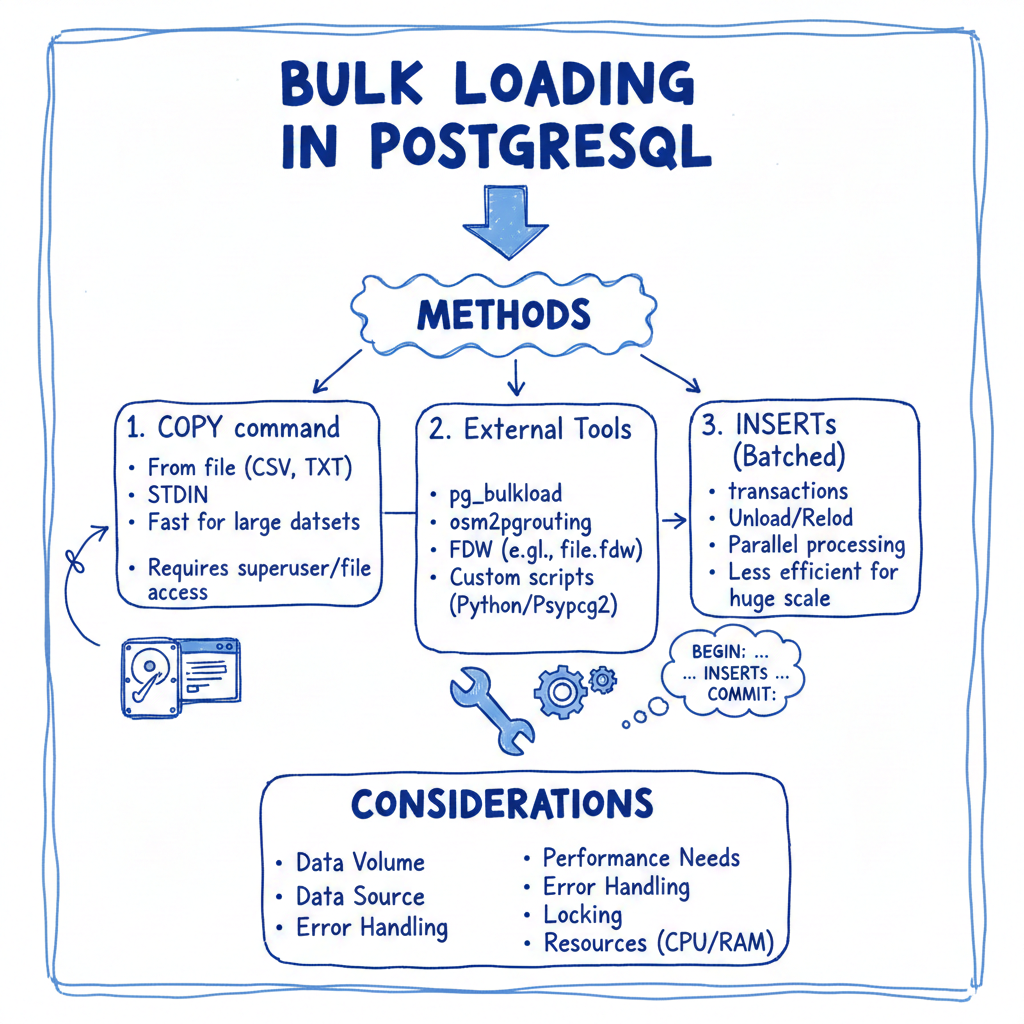
The COPY Protocol
The COPY command bypasses the standard SQL parser. It streams data directly into the heap files. It parses the raw input stream into tuples and writes them to the database pages, significantly reducing CPU cycles.
-- Standard Bulk Load Syntax
COPY target_table (col1, col2, col3)
FROM '/data/source_file.csv'
WITH (FORMAT CSV, HEADER true, DELIMITER ',');
PostgreSQL Optimization Pipeline
Achieving maximum speeds requires a “Drop-Load-Restore” architectural pattern. The goal is to convert random I/O (index updates) into sequential I/O (bulk index creation).
1. Architecture: Staging and Unlogged Tables
For the absolute fastest performance, utilize Unlogged Tables. Unlogged tables do not write to the Write-Ahead Log (WAL). This eliminates disk I/O associated with durability, improving write speeds by 2x–5x.
- Risk: If the server crashes, the table is automatically truncated.
- Strategy: Load into an unlogged staging table first, then move data to the permanent table using INSERT INTO … SELECT.
CREATE UNLOGGED TABLE staging_table (LIKE target_table);
-- Perform COPY into staging_table
-- Move to production (logging happens here, but optimized)
INSERT INTO target_table SELECT * FROM staging_table;
2. Index and Constraint Management
Inserting into a table with existing indexes forces the database to balance the B-Tree incrementally.
- Incremental Update Cost: High random I/O.
- Bulk Creation Cost: Sequential I/O. PostgreSQL sorts the data in memory (using maintenance_work_mem) and builds the index from the bottom up.
Protocol:
- Drop non-unique indexes: Remove secondary indexes to stop immediate updates.
- Drop Foreign Key constraints: FK checks require reads on external tables, which slows down the write process.
- Disable Triggers:
ALTER TABLE target_table DISABLE TRIGGER ALL;
- Load Data: Run the COPY command.
- Re-enable Triggers and Restore Schema: Recreate the indexes and re-add constraints.
3. Server Configuration (GUCs)
Temporarily tuning the postgresql.conf parameters for the current session can drastically alter performance
| Parameter | Recommended (Session) | Impact |
|---|---|---|
| maintenance_work_mem | High (e.g., 2GB – 4GB) | Used for sorting data during CREATE INDEX. If this fits in RAM, index creation is incredibly fast. |
| max_wal_size | Increase (e.g., 4GB+) | Delays checkpoints. Frequent checkpoints during loading will stall I/O. |
| synchronous_commit | off | Returns success to the client before flushing WAL to disk. Essential for speed if you can tolerate data loss on crash during the load. |
| autovacuum_enabled | false (Per table) | Prevents the autovacuum daemon from waking up and scanning the table while you are hammering it with data. |
Applying these settings:
BEGIN;
SET LOCAL synchronous_commit TO OFF;
SET work_mem TO '256MB';
SET maintenance_work_mem TO '4GB';

COPY ...;

COMMIT;
Advanced Parallelism
The standard COPY command is single-threaded. To saturate the I/O of modern NVMe drives, you must parallelize the load.
- Partitioning: If the target table is partitioned (e.g., by date), you can run multiple concurrent COPY commands targeting different partitions simultaneously.
- File Splitting: Split your source CSV into N chunks (where N = number of CPU cores). Open N connections to PostgreSQL and run COPY on each chunk concurrently.
Monitoring Progress
In versions prior to PostgreSQL 14, monitoring COPY was difficult. You can now use the pg_stat_progress_copy view to track live ingestion rates:
SELECT
    pid,
    datid,
    relid::regclass,
    bytes_processed,
    bytes_total,
    (bytes_processed / bytes_total::float) * 100 AS progress_percent
FROM pg_stat_progress_copy;
Conclusion
Optimizing bulk loads is an exercise in resource management. By using the COPY protocol, leveraging unlogged tables to bypass WAL I/O, and maximizing maintenance_work_mem for post-load index reconstruction, you can transform a multi-hour data ingestion job into a process that takes minutes.
Further Reading
- Advanced Query Plan Management in Aurora PostgreSQL
- Troubleshooting MariaDB Performance
- MariaDB 2025 High Availability Best Practices
- Advanced Database Performance Tuning for MariaDB
- Next-Gen Data Management
- Vertica Index Usage and Troubleshooting
- From Chaos to Clarity – Case Study of a Failed CDP Implementation
- Cut Snowflake Spend by 30% in 90 Days