Aurora PostgreSQL Query Plan Management: Stabilizing Performance Across Version Upgrades
When upgrading Amazon Aurora PostgreSQL to a new major version, database administrators must not only plan for compatibility and downtime but also guard against subtle query performance regressions introduced by optimizer changes. Even if the new version delivers better features and overall throughput, a single critical query choosing a worse plan can impact SLAs, throughput, and cost. Aurora PostgreSQL’s advanced query plan management (QPM) addresses this risk by giving DBAs granular control over which plans the optimizer can use, turning plan stability into an explicit, managed process rather than an implicit side effect of statistics and configuration.
Aurora QPM is implemented through the apg_plan_mgmt extension, which integrates tightly with the Aurora PostgreSQL optimizer and execution engine. Instead of letting the optimizer freely change plans whenever statistics, parameters, or schema change, QPM captures plans, classifies them as approved or unapproved, and then allows you to control if, when, and how new plans are considered for execution. This makes QPM especially valuable during major version upgrades, schema refactors, and index changes, where otherwise-benign optimizer enhancements can result in regressions for specific workloads.
How Query Plan Management Works
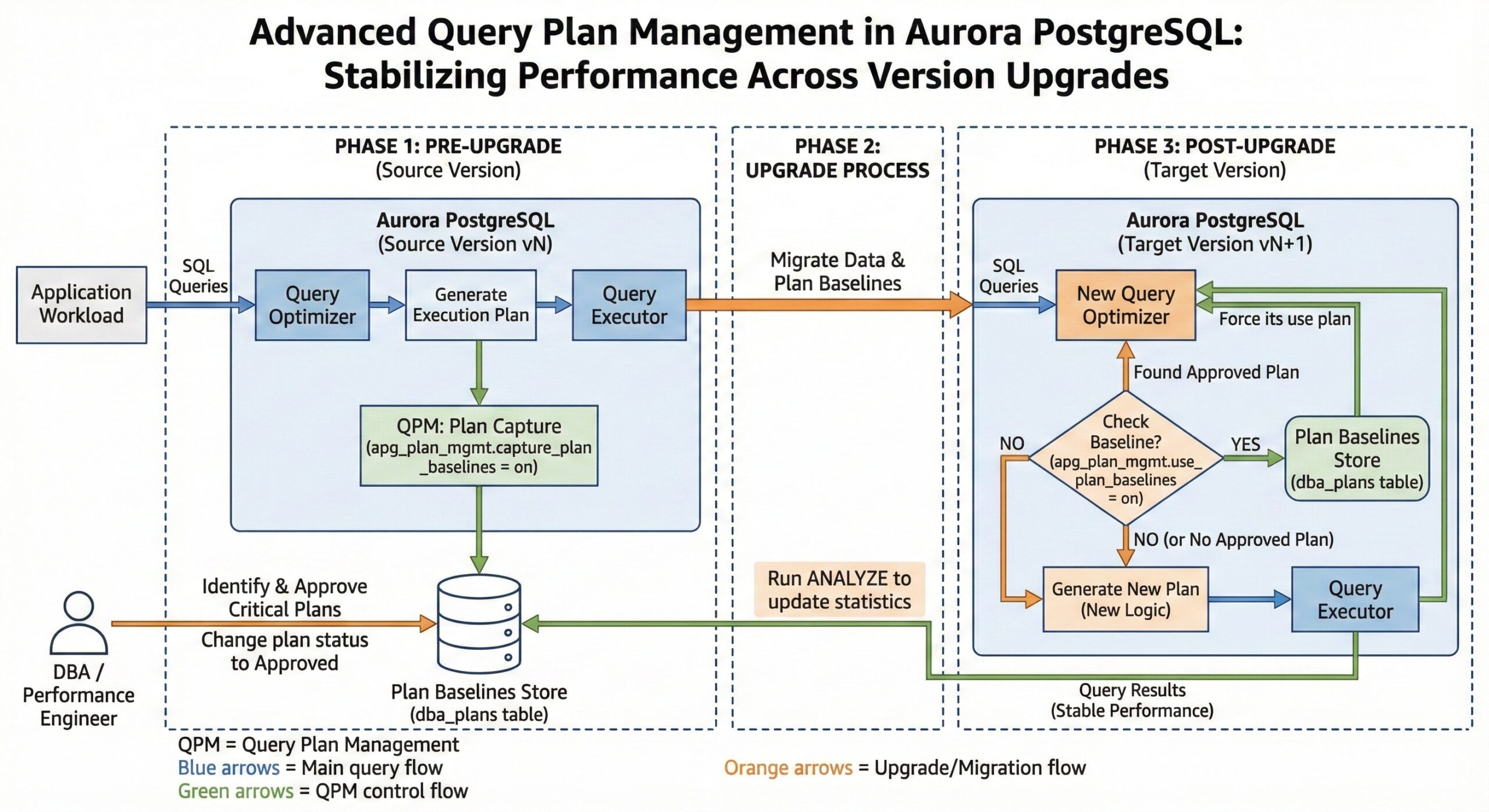
Once QPM is enabled at the cluster and database level, the optimizer tracks “managed statements,” which are SQL statements executed more than once with the same normalized text. For these managed statements, QPM captures each generated plan and stores it in internal catalog tables and views such as apg_plan_mgmt.dba_plans, along with metadata like plan hash, SQL hash, status, enabled flag, and plan outline.
The first captured plan for a managed statement is automatically marked as Approved and becomes part of the baseline for that SQL statement. This baseline is the set of known good plans that QPM is allowed to choose from when executing the statement. Any subsequent plan that the optimizer generates for the same statement is stored as Unapproved, which means it is visible for evaluation but not yet eligible for enforcement. This separation allows DBAs to safely experiment with new plans, optimizer features, or index changes without immediately exposing the application to potential regressions.
During execution, if plan baseline usage is enabled, QPM intercepts the optimizer’s plan choice and restricts it to the set of approved plans for that statement. If multiple approved plans exist, QPM can re-cost them and choose the lowest estimated cost plan, or you can designate preferred plans to further constrain the optimizer’s choice. In some configurations, QPM can also bypass enforcement for trivial low‑cost plans to avoid unnecessary overhead while still protecting complex, high-impact queries.
Plan Evaluation and Evolution
QPM supports both manual and automated workflows for evaluating unapproved plans. Manually, DBAs can query apg_plan_mgmt.dba_plans, run test workloads or benchmarks comparing candidate plans against the current baseline, and then adjust statuses using functions such as apg_plan_mgmt.set_plan_status to promote or demote plans. This works well when you have specific problem queries and a controlled test environment.
For broader workloads, the evolve_plan_baselines function is central. It analyzes performance metrics for unapproved plans compared to the approved baseline using real query executions, actual parameter bindings, and runtime statistics. You can run this procedure in a maintenance window or on a cloned environment to automatically identify the fastest set of plans and update the baseline accordingly, ensuring that plan evolution is guided by empirical performance data instead of just cost estimates.
In addition to plan status, QPM tracks usage statistics such as last execution time, execution counts, and performance indicators, which can help you detect slow drifts in performance or sudden regressions. By periodically reviewing these statistics, you can proactively refresh baselines, retire stale plans that rely on dropped indexes or obsolete data distributions, and keep the approved set aligned with current workload realities.
Role of evolve_plan_baselines After Upgrades
After a major version upgrade, the query optimizer may introduce new join algorithms, costing heuristics, or cardinality estimation improvements that change how it evaluates plans. Although these changes usually improve average performance, they can cause specific queries to adopt plans that are worse than the baseline captured in the previous version. The evolve_plan_baselines function provides a structured way to test new candidate plans against historically good baselines using actual production parameter bindings and runtime characteristics.
In a typical post-upgrade workflow, you first ensure that captured baselines from the old version are available on the upgraded cluster and that plan baseline enforcement is enabled. Then you allow the workload to run and let the optimizer generate new unapproved plans under the new version. By running evolve_plan_baselines, you can compare performance across various parameters and data conditions, automatically approve any clearly superior plans, and keep regressions confined to the evaluation phase instead of impacting live traffic.
Beyond simple approval, this process enables a gradual adoption of new optimizer capabilities. You can leverage the upgraded engine’s improved features for queries where the new plan is demonstrably better, while retaining old, proven plans for sensitive queries where new strategies are risky or unstable. This balance between stability and adaptability is one of QPM’s primary design goals.
Best Practices for Version Upgrades
To minimize the risk of performance degradation, QPM should be enabled and configured before initiating a major version upgrade so that the current version’s plans can be captured under realistic production load. In practice, this means installing the apg_plan_mgmt extension, enabling plan management parameters, and turning on automatic plan capture in your production cluster well in advance of the upgrade so that you build a rich baseline set.
AWS recommends treating plan baselines as an asset to carry across major versions. Before upgrading, you should verify that rds.enable_plan_management and related parameters are set appropriately and that you have captured plans for your most critical SQL statements and reporting workloads. After the upgrade, ensure that baseline enforcement remains enabled so the upgraded cluster continues to use your approved plans, and only then begin experimenting with new plans through evolve_plan_baselinesor manual evaluation.
It is also important to read the Aurora PostgreSQL and apg_plan_mgmt release notes for each target version because QPM capabilities, defaults, and behaviors can change over time. Release documentation often highlights new plan evaluation metrics, parameter changes, compatibility considerations, or improvements in baseline migration across versions, all of which affect how you should structure your upgrade and testing strategy.
Monitoring and Continuous Optimization
Beyond one-time upgrades, QPM provides continuous value by making plan behavior observable and controllable over the full lifecycle of an application. Monitoring tools and views expose information about captured plans, plan status transitions, execution counts, and performance trends, enabling you to correlate plan changes with latency spikes, CPU usage, or throughput drops.
This monitoring helps detect issues such as plan changes triggered by statistics refreshes, data skew, index creation or removal, and configuration changes. When you observe a regression, you can roll back to a previously approved plan, disable problematic plans, or temporarily lock a critical statement to a specific plan while you investigate. This reactive use of QPM complements the proactive upgrade strategy, turning QPM into an ongoing guardrail against performance surprises.
In more advanced setups, QPM also assists with capacity planning and index management. Because QPM can reveal which plans actually get used and how they benefit from particular indexes, you can identify unused or marginal indexes, test index changes with minimal production risk, and verify that newly created indexes produce the expected plan improvements before fully committing to them.
Practical Implementation Steps
From an operational perspective, configuring QPM involves several key steps. First, a user with rds_superuser privileges installs the apg_plan_mgmt extension and confirms that plan management parameters in the cluster parameter group are set to enable plan capture and baseline usage. This usually includes turning on automatic plan capture for statements executed multiple times and instructing the optimizer to consider plan baselines when generating execution plans.
Next, you run representative workloads—either production traffic or replayed traces—and let QPM capture initial plans for your critical queries. During this period, you can identify high-value SQL statements, review their plans in apg_plan_mgmt.dba_plans, and tune them using tools like pg_hint_plan or index adjustments before locking in the best-performing plans as approved baselines. This combination of tuning plus QPM creates a curated set of plans that you then protect across upgrades.
For day‑to‑day operations, you can schedule periodic executions of evolve_plan_baselines to allow controlled evolution of plans as data volume, distribution, and workload change. When potential regressions arise, QPM gives you immediate levers to revert to known good plans without changing application code, which is particularly useful for third-party applications or environments with strict change-control processes.
Why QPM Matters for Enterprise Aurora Deployments
In large Aurora PostgreSQL deployments, plan instability can translate directly into business risk through missed SLAs, higher infrastructure costs, and firefighting during or after upgrades. Traditional approaches—such as freezing statistics, avoiding new optimizer features, or resisting upgrades—delay the problem rather than solving it. QPM, by contrast, creates an explicit framework to adopt newer versions and features while retaining control over how individual queries behave.
By leveraging the apg_plan_mgmt extension, capturing and curating baselines before upgrades, and using both proactive and reactive plan management practices, organizations can modernize Aurora PostgreSQL clusters with far more confidence. As Aurora continues to evolve with new optimizer capabilities and performance enhancements, QPM remains a foundational mechanism to ensure that these improvements translate into real-world benefits without compromising the stability and predictability of mission-critical workloads.