PostgreSQL 18 Performance Tuning: A Practical Guide for Modern Workloads
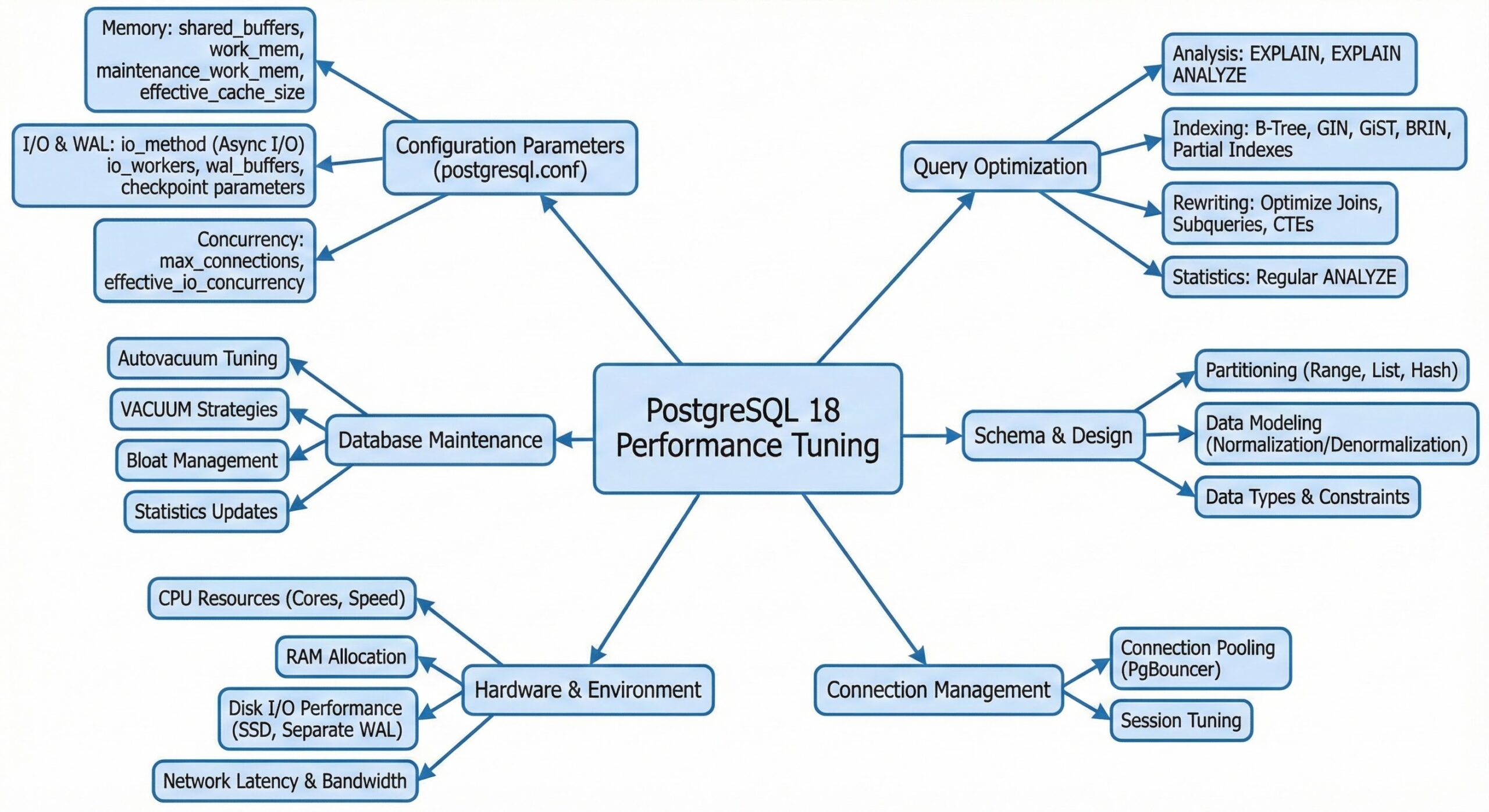
PostgreSQL 18 introduces significant enhancements in asynchronous I/O and query planning, but performance optimization still hinges on a focused set of configuration parameters (GUCs) . This guide provides a concise, actionable checklist to optimize your PostgreSQL 18 deployment, balancing new I/O capabilities with timeless tuning principles.
Optimizing PostgreSQL 18’s New I/O Features
PostgreSQL 18 debuts an internal asynchronous I/O (AIO) subsystem, offering granular control over read operations . Properly configuring these new variables is key to unlocking performance on modern storage.
- io_method
- Purpose: Selects the I/O backend (e.g., synchronous vs. async).
- Recommendation: For OLTP workloads on Linux with NVMe storage, use io_method = aio (or a platform-specific async option) after benchmarking . For legacy storage or if issues arise, retain the default sync setting .
- io_workers
- Purpose: Defines the number of background workers for async I/O requests.
- Recommendation: Start with min(8, #CPU cores / 2) for high-throughput systems, then fine-tune using iostat and pg_stat_io . For small VMs (2–4 vCPUs), limit this to 2–4 to prevent overprovisioning .
- io_combine_limit / io_max_combine_limit
- Purpose: Controls the merging of adjacent I/O requests to improve sequential throughput.
- Recommendation: For analytics workloads, increase these values (1–4 MB equivalents) to maximize throughput . For latency-sensitive OLTP on flash storage, keep values near defaults to avoid delays from large merges .
- io_max_concurrency
- Purpose: Limits the number of concurrent async I/O operations.
- Recommendation: Begin with 2–4 × #data devices (e.g., NVMe count) and adjust based on observed queue depth and latency .
Core Memory Configuration for Maximum Efficiency
The majority of PostgreSQL performance gains come from correctly sizing memory-related parameters .
- shared_buffers
- Purpose: The primary buffer cache for PostgreSQL.
- Recommendation: On dedicated bare-metal Linux servers, allocate 25–40% of RAM, but rarely exceed 16–32 GB to ensure sufficient space for the OS page cache . In cloud environments with noisy neighbors, lean toward the lower end to accommodate OS and background processes .
- work_mem
- Purpose: Memory allocated per operation (e.g., sort, hash) within a query.
- Recommendation: Avoid setting a high global value. Calculate to ensure effective_concurrent_queries × avg_sort_nodes × work_mem fits in available RAM . Start with 16–64 MB globally, and increase per-session for heavy reporting tasks .
- maintenance_work_mem
- Purpose: Memory for maintenance tasks like VACUUM and CREATE INDEX.
- Recommendation: For dedicated maintenance windows, set to 1–4 GB to speed up large index builds . For mixed workloads, 512 MB–1 GB is sufficient for continuous VACUUM operations.
- effective_cache_size
- Purpose: A planner hint for the total cache (OS + PostgreSQL).
- Recommendation: On a dedicated host, set to 50–75% of RAM to encourage efficient index usage when data is cache-resident .
Tuning WAL, Durability, and Write Throughput
Write-heavy workloads demand careful tuning of WAL and checkpoint settings to prevent I/O stalls .
- wal_level
- Recommendation: Use replica for most production systems to maintain flexibility for replication; reserve minimal for special maintenance scenarios .
- synchronous_commit
- Recommendation: For latency-critical applications where losing a few transactions on a crash is acceptable, set to off for application connections while keeping on for critical jobs . For strict durability, keep on and rely on fast storage.
- checkpoint_timeout, max_wal_size, checkpoint_completion_target
- Recommendation: For OLTP, set checkpoint_timeout to 15–30 minutes, size max_wal_size to trigger time-based checkpoints, and set checkpoint_completion_target to 0.7–0.9 for smooth I/O . For heavier write loads, increase max_wal_size significantly (tens of GB) .
- wal_compression
- Recommendation: Enable if CPU resources are ample and WAL volume is high; this can significantly reduce I/O during large updates .
Optimizing Parallelism and Query Planning
PG 18’s improved planner and features like incremental sorting make parallel query tuning essential .
- max_worker_processes, max_parallel_workers, max_parallel_workers_per_gather
- Recommendation: Set max_worker_processes to at least match other worker limits, starting near the number of CPU cores . For OLTP, keep max_parallel_workers_per_gather low (0–2) to avoid over-parallelization . For analytics, allow 4–8 workers per gather on large scans .
- Planner Toggles (enable_*)
- Recommendation: PG 18’s enhanced planner reduces the need to disable features. Use enable_nestloop, enable_hashjoin, etc., only for targeted experiments, not as permanent fixes .
- default_statistics_target & Extended Statistics
- Recommendation: For complex schemas, increase default_statistics_target to 100–200 and create extended statistics on correlated columns to improve plan accuracy . Run ANALYZE aggressively after bulk loads and upgrades .
Managing Autovacuum and Preventing Bloat
Effective MVCC management through autovacuum remains critical for sustained performance .
- autovacuum
- Recommendation: Never disable globally. Tune per-table: increase thresholds for large, append-only tables and decrease them for hot OLTP tables prone to bloat .
- autovacuum_vacuum_scale_factor / autovacuum_analyze_scale_factor
- Recommendation: For heavily updated tables, use low scale factors (0.01–0.05) . For mostly-append tables, keep defaults to minimize unnecessary autovacuum activity.
- autovacuum_max_workers, autovacuum_naptime, autovacuum_cost_limit
- Recommendation: On large clusters, increase autovacuum_max_workers (5–10+) and autovacuum_cost_limit, ensuring your storage can handle the I/O load . Reduce autovacuum_naptime from the default 60 seconds if bloat is detected on busy systems.
- log_autovacuum_min_duration
- Recommendation: Set to a low value (e.g., 1s) to monitor long-running autovacuum tasks without flooding logs .
Enhancing Observability and Tuning Methodology
Effective tuning requires robust logging and a disciplined approach .
- pg_stat_statements
- Recommendation: Always enable this extension to identify top resource-consuming queries and performance regressions before adjusting global settings .
- Logging Controls
- Recommendation: Set log_min_duration_statement to 500–2000 ms to capture genuinely slow queries . Enable log_checkpoints and log_lock_waitsto diagnose checkpoint storms and lock contention .
- Tuning Methodology
- Best Practice: Change only one parameter group at a time. Validate changes with steady-state benchmarks, monitor pg_stat_io and system metrics for AIO tuning , and use EXPLAIN (ANALYZE, BUFFERS) to understand query-level impacts .
Conclusion
PostgreSQL 18 delivers powerful new I/O capabilities, but a strategic, workload-specific approach to configuration remains paramount. By focusing on these key GUCs and following a methodical tuning process, you can achieve optimal performance and stability for your database.
Further Reading
- Optimizing Pagination in PostgreSQL 17
- Deep Dive: High-Throughput Bulk Loading in PostgreSQL
- Advanced Query Plan Management in Aurora PostgreSQL
- Deep Dive into RocksDB’s LSM-Tree Architecture
- Design Scalable Soft Deletes and Audit Logs for MongoDB