Optimizing Query Performance in Snowflake: Clustering Keys vs. Search Optimization Service
In modern data warehousing, performance at scale is critical. Snowflake offers two powerful features—Clustering Keys and the Search Optimization Service (SOS)—to accelerate query performance on large datasets. While both aim to reduce data scanning and improve efficiency, they serve fundamentally different use cases and operate through distinct mechanisms. Understanding when and how to use each is essential for building high-performance, cost-efficient analytics architectures.
This guide explores the strategic application of Clustering Keys and SOS, helping data engineers and architects make informed decisions based on workload patterns, data characteristics, and performance requirements.
What Are Clustering Keys?
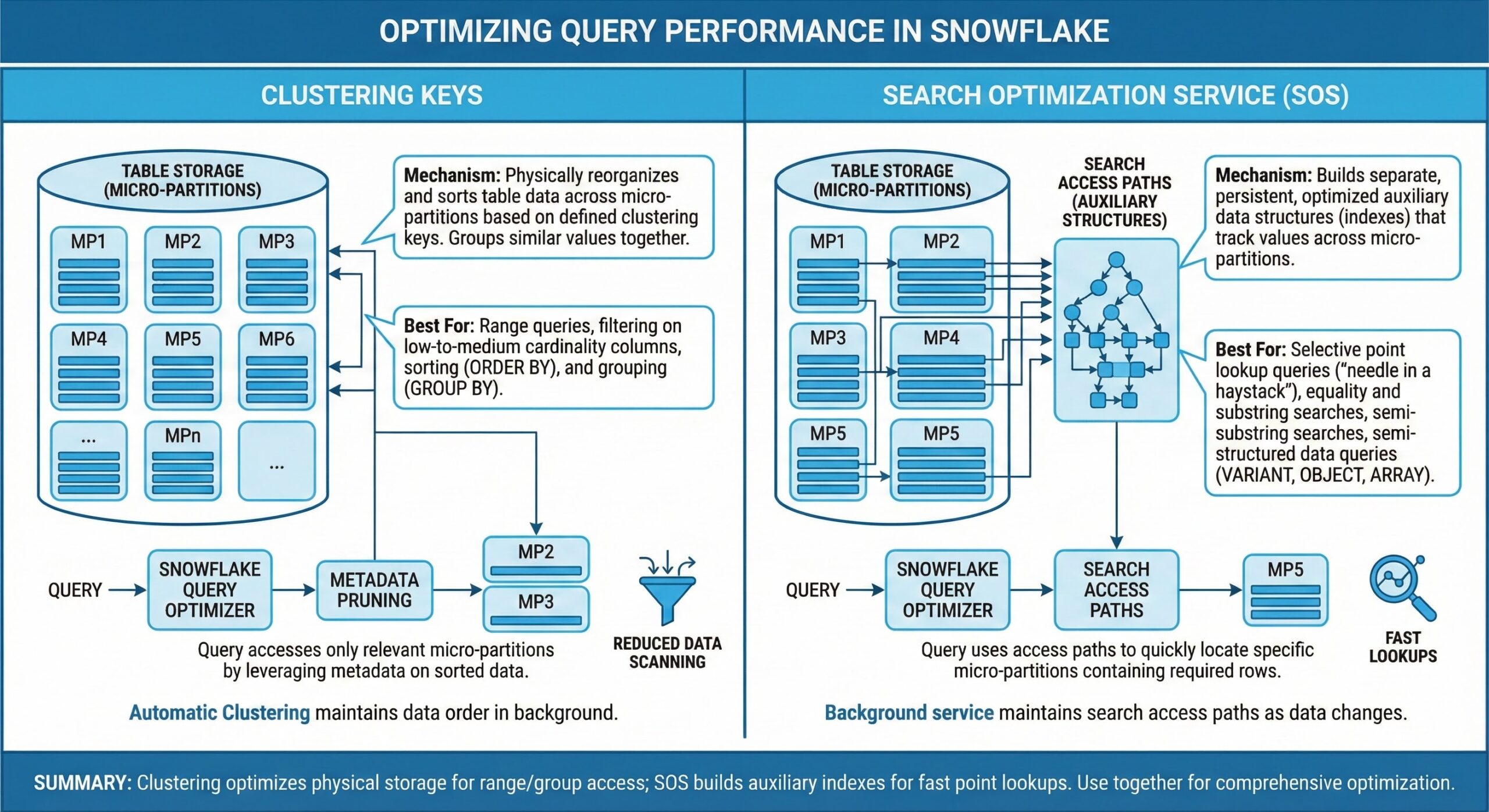
Clustering in Snowflake refers to the physical organization of data within micro-partitions—the fundamental storage units that automatically compress and organize table data. By default, Snowflake handles micro-partitioning internally, but for very large tables with predictable access patterns, manually defining a clustering key can significantly enhance performance.
A clustering key is a set of one or more columns used to co-locate related data across micro-partitions. When queries filter on these columns, Snowflake can skip irrelevant partitions during scans—a process known as partition pruning—reducing the amount of data read and improving query speed .
When to Use Clustering Keys
Clustering is most effective under the following conditions:
- Large Tables: Ideal for tables ranging from hundreds of gigabytes to multiple terabytes, where natural micro-partitioning alone is insufficient .
- Stable Query Patterns: Best suited for analytical workloads that repeatedly filter or join on the same dimensions, such as event_date, customer_id, or region .
- Range or Equality Filters: Performs well with WHERE clauses involving date ranges or equality checks on low-to-medium cardinality columns .
- Large Result Sets: Optimal for queries returning many rows, such as aggregations, reports, or dashboard summaries .
Operational and Cost Considerations
Clustering incurs ongoing reclustering costs—compute resources required to maintain the physical order of data as new rows are inserted or updated . Tables with frequent DML operations may require automatic reclustering, which consumes credits. However, clustering does not require additional storage beyond the table itself .
Mental Model: Use clustering when your workload involves scanning large slices of a big table using consistent filters. It’s a coarse-grained optimization that improves partition pruning for broad analytical queries .
What Is the Search Optimization Service (SOS)?
The Search Optimization Service is a Snowflake feature designed to accelerate highly selective queries by creating additional search access paths over table data. Unlike clustering, which reorganizes data layout, SOS builds metadata structures that allow Snowflake to jump directly to a small subset of relevant micro-partitions, even for complex or non-clustered filters .
SOS is particularly effective for point lookups and queries involving high-cardinality columns, text patterns, or semi-structured data (e.g., JSON/VARIANT columns) .
When to Use Search Optimization Service
SOS shines in the following scenarios:
- Highly Selective Queries: Ideal for retrieving a few rows from billions—such as looking up a user by user_id or a transaction by uuid .
- High-Cardinality Columns: Excels with unique identifiers, IP addresses, device IDs, and other sparse data types .
- Pattern Matching: Supports LIKE, STARTSWITH, REGEXP, and full-text search patterns, which are inefficient with standard scanning .
- Semi-Structured Data: Accelerates filters on VARIANT, OBJECT, or geospatial columns where traditional indexing is challenging .
Operational and Cost Considerations
SOS requires additional storage for the search paths and consumes compute resources to maintain them during DML operations . It is best reserved for mission-critical workloads where sub-second latency is essential—such as interactive dashboards, customer-facing applications, or real-time analytics .
Mental Model: Use SOS when you need index-like performance for pinpoint lookups or complex filters that clustering cannot efficiently resolve .
Clustering vs. Search Optimization: A Direct Comparison
To clarify the differences, here is a comparative overview:
| Aspect | Clustering Keys | Search Optimization Service |
|---|---|---|
| Primary goal | Improve partition pruning for large scans | Speed up highly selective lookups |
| Best for result size | Medium to large result sets | Very small result sets (few rows) |
| Query pattern | Stable filters on a few dimensions | Multiple diverse filters, point lookups, patterns |
| Data type fit | Numeric, dates, low–medium cardinality dims | High-cardinality IDs, text, VARIANT, geo |
| Physical effect | Reorders micro-partitions (data layout) | Builds search paths on top of existing layout |
| Cost characteristics | Reclustering compute only | Extra storage + maintenance compute |
| Sensitivity to updates | Degrades with heavy updates | Handles updates but more paths = more maintenance |
Rules of Thumb for Choosing the Right Strategy
Start with No Manual Optimization
Snowflake’s default micro-partitioning is highly effective for many workloads. Avoid premature optimization—only introduce clustering or SOS when query performance metrics indicate a clear bottleneck .
Prefer Clustering When:
- Your table is very large and the most expensive queries consistently filter on a small, stable set of columns .
- Those columns appear in nearly every query and have reasonable cardinality (e.g., date, category, region) .
- You’re running analytical reports or aggregations over large data slices .
Prefer SOS When:
- Queries are highly selective but still scan many micro-partitions due to lack of clustering on the filter column .
- You’re filtering on high-cardinality fields (e.g., id, email, device_id) or using text/pattern matching .
- Low latency is critical—for example, in user-facing applications where response time impacts experience .
Combine Both When:
- A single large table supports both broad analytical queries and ultra-selective lookups .
- Example: An event table clustered by event_date and customer_id for daily reports, while SOS accelerates lookups by session_id or user_agent for debugging tools .
In such cases, cluster on the primary analytical dimensions and apply SOS selectively to the columns driving critical, low-latency queries .
Best Practices and Strategic Recommendations
- Monitor Query Performance First: Use Snowflake’s query profile and EXPLAINplans to identify scanning inefficiencies before applying optimizations .
- Avoid Over-Clustering: Too many clustering keys increase complexity and reclustering overhead. Stick to 1–3 highly selective, frequently filtered columns .
- Use SOS Selectively: Enable SOS only on tables and columns where the performance gain justifies the storage and compute cost .
- Leverage Automatic Clustering: For tables with dynamic access patterns, enable automatic clustering to maintain optimal data layout without manual intervention .
- Test in Production-Like Environments: Validate the impact of clustering or SOS using representative data volumes and query loads .
- Combine with Other Optimizations: Use clustering and SOS alongside other Snowflake features like materialized views, result caching, and query acceleration services for maximum efficiency .
Conclusion
Clustering Keys and the Search Optimization Service are not competing features—they are complementary tools in Snowflake’s performance optimization toolkit. Clustering improves efficiency for large-scale analytical scans by organizing data physically, while SOS provides index-like speed for pinpoint lookups through metadata acceleration.
The key to success lies in understanding your data access patterns. Use clustering for predictable, broad-range queries over large datasets. Use SOS for unpredictable, highly selective filters—especially on high-cardinality or semi-structured data. When both patterns exist, don’t hesitate to combine them strategically.
By aligning your optimization strategy with workload characteristics, you can achieve optimal performance, reduce credit consumption, and deliver responsive analytics at scale.
Further Reading
- Cloud Native Database Systems Support from MinervaDB
- Data Lakes Engineering and Support from MinervaDB
- From XL to XS: A Practical Guide to Rightsizing Snowflake
- Optimizing Pagination in PostgreSQL 17
- Leveraging Snowflake Optima for Intelligent Workload Optimization