Covered Queries in MongoDB: The Secret to Lightning-Fast Reads
In the world of database optimization, few techniques offer as dramatic performance improvements as MongoDB’s covered queries. These specialized queries represent the pinnacle of read efficiency, capable of delivering results at lightning speed by bypassing document access entirely. For developers and database administrators seeking to maximize their MongoDB performance, understanding and implementing covered queries is not just beneficial—it’s essential.
What Are Covered Queries?
A covered query is a query that can be satisfied entirely using an index and does not have to examine any documents. This means MongoDB can both match the query conditions and return the results using only the index, without ever touching the actual collection documents.
Think of it as having a perfectly organized filing system where you can find exactly what you need just by looking at the index cards, without ever opening the actual files. This fundamental difference in data access patterns is what makes covered queries so remarkably fast.
The Technical Foundation: How Covered Queries Work
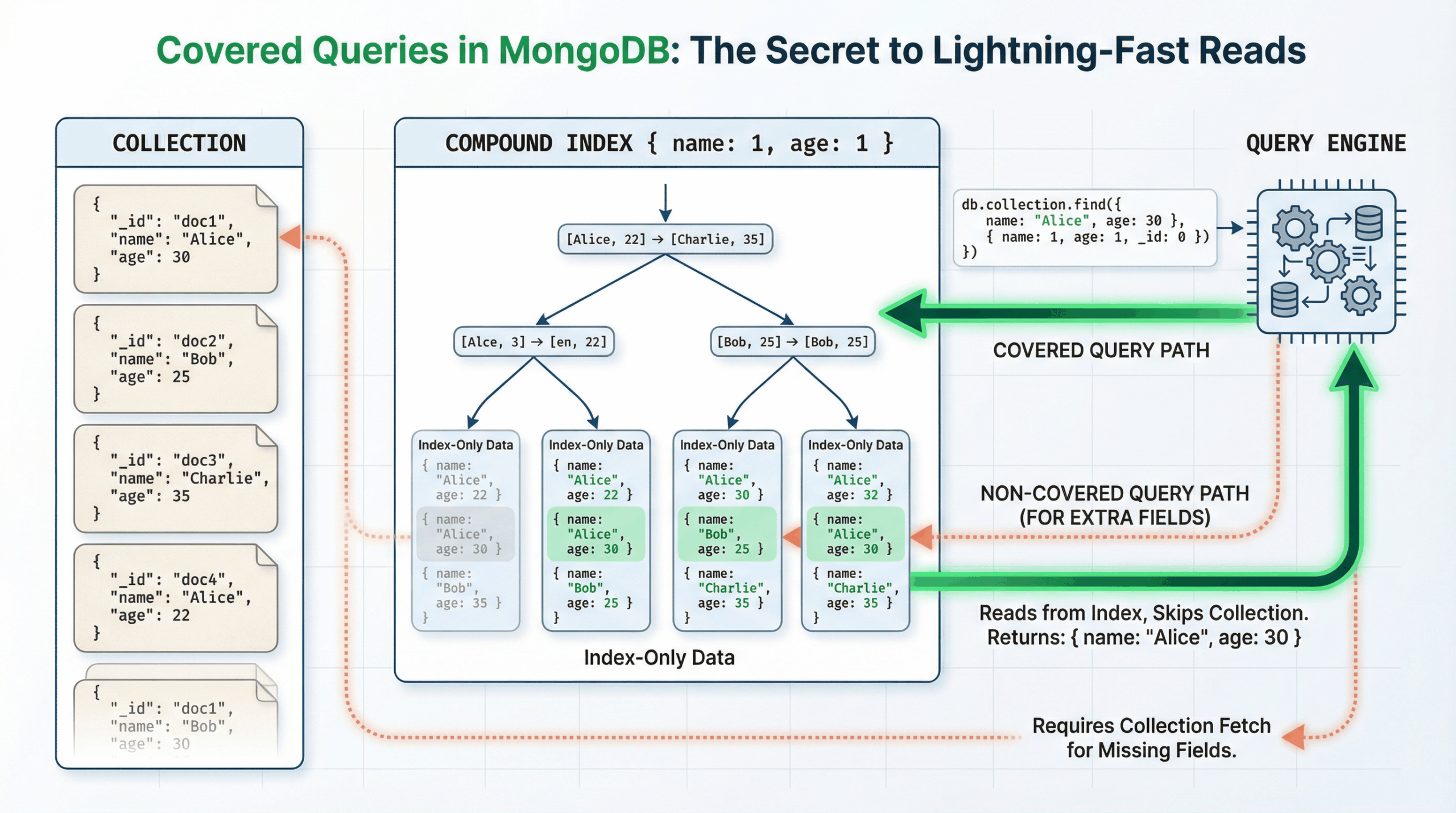
Core Requirements
For a query to be considered “covered,” it must meet three critical requirements:
- All query fields must be part of an index – Every field used in the query filter, including those needed internally for sharding purposes, must exist in the same index
- All returned fields must be in the same index – The projection (fields returned to the client) must only include fields present in the index
- No null field queries – Fields being queried cannot be equal to null, as queries like { “field”: null } or { “field”: { $eq: null } } cannot result in covered queries
Performance Benefits
The performance advantages of covered queries stem from fundamental differences in data access patterns1:
- Smaller data footprint: Index keys are typically much smaller than the documents they catalog
- Memory efficiency: Indexes are typically available in RAM or located sequentially on disk
- Reduced I/O operations: No need to access collection documents, eliminating additional disk reads
- Network optimization: Less data transfer between storage and processing layers
MongoDB performs best when the application’s indexes and frequently accessed data fits in memory, making covered queries particularly valuable for high-performance applications.
Implementation Guide: Creating Your First Covered Query
Basic Example
Let’s start with a simple example using a users collection:
// Create an index on username and email
db.users.createIndex({ username: 1, email: 1 })

// This query will be covered
db.users.find(
  { username: "john_doe" },
  { email: 1, _id: 0 }
)
Notice the crucial _id: 0 in the projection. The _id field is always returned by default, and since it’s not part of our index, we must explicitly exclude it.
Compound Index Implementation
For more complex scenarios, compound indexes following the ESR (Equality, Sort, Range) rule provide optimal performance:
// Create a compound index following ESR rule
db.inventory.createIndex({
  type: 1,        // Equality
  item: 1,        // Sort
  price: 1,       // Range
  expiryDate: 1   // Additional fields for coverage
})

// Covered query using the compound index
db.inventory.find(
  {
    type: "food",
    price: { $gte: 10, $lte: 50 }
  },
  {
    item: 1,
    price: 1,
    expiryDate: 1,
    _id: 0
  }
).sort({ item: 1 })
Aggregation Pipeline Coverage
Covered queries aren’t limited to simple find operations. They can also be achieved in aggregation pipelines:
db.inventory.aggregate([
  { $match: {
    type: "food",
    expiryDate: { $gt: ISODate("2025-07-10T00:00:00Z") }
  }},
  { $sort: { item: 1 }},
  { $project: {
    _id: 1,
    price: 1
  }}
])
Verification: Confirming Your Covered Queries
Using explain() Method
The most reliable way to verify if your query is covered is using the explain() method:
db.users.find(
  { username: "john_doe" },
  { email: 1, _id: 0 }
).explain("executionStats")
Look for these key indicators in the output:
- totalDocsExamined: 0 – This is the definitive sign of a covered query
- totalKeysExamined – Should be greater than 0, showing index usage
- executionTimeMillis – Typically very low for covered queries
Example Explain Output
{
  "executionStats": {
    "totalDocsExamined": 0,      // ✓ Covered query confirmed
    "totalKeysExamined": 1,      // ✓ Index was used
    "executionTimeMillis": 2,    // ✓ Fast execution
    "indexName": "username_1_email_1"
  }
}
Best Practices for Optimal Performance
1. Follow the ESR Rule
When creating compound indexes, order fields according to the ESR rule:
- Equality queries first
- Sort fields second
- Range queries last
This ordering maximizes index efficiency and increases the likelihood of achieving covered queries.
2. Strategic Field Selection
Design your indexes to cover the most common query patterns:
// Analyze your query patterns first
db.users.find({ status: "active", department: "engineering" })
  .sort({ lastLogin: -1 })
  .limit(10)

// Create an index that covers this pattern
db.users.createIndex({
  status: 1,
  department: 1,
  lastLogin: -1
})
3. Projection Optimization
Always use projections to limit returned fields to those in your index:
// Instead of returning all fields
db.users.find({ status: "active" })

// Use projection for covered query
db.users.find(
  { status: "active" },
  { username: 1, email: 1, _id: 0 }
)
Common Pitfalls and How to Avoid Them
1. The _id Field Trap
The most common mistake is forgetting about the _id field. Since it’s included by default, you must either:
- Explicitly exclude it: { _id: 0 }
- Include it in your index
2. Null Value Queries
Queries involving null values cannot be covered:
// This cannot be a covered query
db.users.find({ email: null })

// This cannot be covered either
db.users.find({ email: { $eq: null } })
3. Incomplete Index Coverage
Ensure all queried and projected fields are in the same index:
// Index only covers username and email
db.users.createIndex({ username: 1, email: 1 })

// This query cannot be covered (missing 'status' field)
db.users.find(
  { username: "john", status: "active" },
  { email: 1, _id: 0 }
)
Advanced Scenarios and Considerations
Sharded Clusters
In sharded environments, covered queries have additional requirements. The shard key must be part of the index because MongoDB internally needs to access shard key fields. This makes it crucial to include shard key fields in your covering indexes.
// If 'userId' is your shard key
db.users.createIndex({
  userId: 1,      // Shard key (required)
  username: 1,
  email: 1
})
Memory Considerations
Covered queries are most effective when indexes fit in memory. Monitor your index sizes and available RAM:
// Check index sizes
db.users.stats().indexSizes

// Monitor memory usage
db.serverStatus().wiredTiger.cache
Performance Monitoring
Use MongoDB’s built-in tools to monitor covered query performance:
- MongoDB Compass: Visualize index coverage and query performance
- Atlas Performance Advisor: Get automated suggestions for index optimization
- Query Profiler: Identify slow queries that could benefit from covered query optimization
Real-World Implementation Examples
E-commerce Product Search
// Product catalog with frequent searches
db.products.createIndex({
  category: 1,
  price: 1,
  rating: 1,
  name: 1
})

// Covered query for product listings
db.products.find(
  {
    category: "electronics",
    price: { $lte: 1000 },
    rating: { $gte: 4.0 }
  },
  {
    name: 1,
    price: 1,
    rating: 1,
    _id: 0
  }
).sort({ price: 1 })
User Activity Tracking
// Index for user activity queries
db.activities.createIndex({
  userId: 1,
  timestamp: -1,
  action: 1
})

// Covered query for recent user activities
db.activities.find(
  {
    userId: ObjectId("..."),
    timestamp: { $gte: ISODate("2026-01-01") }
  },
  {
    action: 1,
    timestamp: 1,
    _id: 0
  }
).sort({ timestamp: -1 })
Social Media Feed Optimization
// Index for social media posts
db.posts.createIndex({
  authorId: 1,
  createdAt: -1,
  visibility: 1,
  title: 1
})

// Covered query for user's public posts
db.posts.find(
  {
    authorId: ObjectId("..."),
    visibility: "public",
    createdAt: { $gte: ISODate("2026-01-01") }
  },
  {
    title: 1,
    createdAt: 1,
    _id: 0
  }
).sort({ createdAt: -1 })
Performance Optimization Strategies
Index Design Patterns
1. Prefix Matching Strategy
Design indexes that can serve multiple query patterns:
// Single index serving multiple queries
db.orders.createIndex({
  customerId: 1,
  status: 1,
  orderDate: -1,
  totalAmount: 1
})

// Query 1: Customer's orders
db.orders.find(
  { customerId: ObjectId("...") },
  { status: 1, orderDate: 1, _id: 0 }
)

// Query 2: Customer's pending orders
db.orders.find(
  { customerId: ObjectId("..."), status: "pending" },
  { orderDate: 1, totalAmount: 1, _id: 0 }
)
2. Sparse Index Optimization
Use sparse indexes for fields that are not present in all documents:
// Sparse index for optional fields
db.users.createIndex(
  { premiumExpiry: 1, username: 1, email: 1 },
  { sparse: true }
)

// Covered query for premium users only
db.users.find(
  { premiumExpiry: { $gt: new Date() } },
  { username: 1, email: 1, _id: 0 }
)
Query Pattern Analysis
Before implementing covered queries, analyze your application’s query patterns:
// Enable profiler to capture slow queries
db.setProfilingLevel(2, { slowms: 100 })

// Analyze collected data
db.system.profile.find().limit(5).sort({ ts: -1 }).pretty()

// Identify common patterns and create covering indexes
Measuring Success: Performance Metrics
Before and After Comparison
Track these metrics to measure covered query impact:
- Query execution time: Often 10-100x faster
- Documents examined: Should drop to 0
- Memory usage: Reduced working set size
- CPU utilization: Lower processing overhead
Benchmarking Example
// Non-covered query performance
db.users.find({ username: "john" }).explain("executionStats")
// Result: totalDocsExamined: 1, executionTimeMillis: 15

// Covered query performance
db.users.find({ username: "john" }, { email: 1, _id: 0 }).explain("executionStats")
// Result: totalDocsExamined: 0, executionTimeMillis: 2
Load Testing Considerations
When implementing covered queries in production:
- Test with realistic data volumes: Performance gains are more pronounced with larger datasets
- Monitor index memory usage: Ensure indexes fit in available RAM
- Validate query plans: Use explain() to confirm queries remain covered after schema changes
- Track application metrics: Monitor response times and throughput improvements
Troubleshooting Common Issues
Query Not Covered Despite Proper Index
If your query isn’t being covered despite having the right index:
- Check field order: Ensure query fields match index field order for equality conditions
- Verify projection: All projected fields must be in the index
- Examine data types: Ensure query values match indexed field types
- Review query operators: Some operators may prevent index coverage
Index Selection Problems
MongoDB’s query optimizer might choose a different index:
// Force index usage for testing
db.users.find({ username: "john" }, { email: 1, _id: 0 })
  .hint({ username: 1, email: 1 })
  .explain("executionStats")
Memory Pressure Issues
If indexes don’t fit in memory:
- Prioritize most frequent queries: Create covering indexes for high-traffic patterns
- Consider index compression: Use prefix compression for string-heavy indexes
- Monitor working set: Ensure critical indexes remain memory-resident
Advanced Techniques
Partial Index Coverage
Use partial indexes to cover queries on document subsets:
// Partial index for active users only
db.users.createIndex(
  { department: 1, lastLogin: -1, email: 1 },
  { partialFilterExpression: { status: "active" } }
)

// Covered query for active users
db.users.find(
  { status: "active", department: "engineering" },
  { email: 1, lastLogin: 1, _id: 0 }
)
Text Search Coverage
Combine text indexes with covering fields:
// Compound index with text search
db.articles.createIndex({
  "$**": "text",
  category: 1,
  publishDate: -1,
  title: 1
})

// Covered text search query
db.articles.find(
  {
    $text: { $search: "mongodb performance" },
    category: "database"
  },
  {
    title: 1,
    publishDate: 1,
    _id: 0
  }
)
Future-Proofing Your Implementation
Schema Evolution Considerations
When planning covered queries:
- Anticipate field additions: Leave room for future fields in index design
- Version your indexes: Use naming conventions that allow for index evolution
- Monitor query patterns: Regularly review and optimize based on usage patterns
- Plan for data growth: Ensure indexes remain effective as collections scale
Maintenance Best Practices
- Regular index analysis: Periodically review index usage and effectiveness
- Automated monitoring: Set up alerts for query performance degradation
- Documentation: Maintain clear documentation of index purposes and covered queries
- Testing procedures: Establish processes for validating covered queries after changes
Conclusion: Maximizing Your MongoDB Performance
Covered queries represent one of the most powerful optimization techniques available in MongoDB, offering dramatic performance improvements with relatively simple implementation. By understanding the core requirements—ensuring all query and projection fields exist in the same index while avoiding null queries—you can transform slow, document-scanning operations into lightning-fast index-only reads.
The key to success lies in strategic planning: analyze your query patterns, design indexes that cover your most common operations, and always verify your implementations using the explain() method. Remember to follow the ESR rule for compound indexes, handle the _id field appropriately, and consider the unique requirements of sharded environments.
As your application scales, covered queries become increasingly valuable, providing consistent performance regardless of collection size. The investment in properly designed covering indexes pays dividends in reduced latency, improved throughput, and better resource utilization.
Start implementing covered queries in your MongoDB applications today, and experience the dramatic performance improvements that come from this fundamental optimization technique. Your users—and your infrastructure—will thank you for the lightning-fast response times that only covered queries can deliver.
The journey to MongoDB performance optimization doesn’t end with covered queries, but mastering this technique provides a solid foundation for building high-performance, scalable applications. Whether you’re dealing with e-commerce catalogs, user activity tracking, or complex analytical workloads, covered queries offer a path to exceptional database performance that scales with your application’s growth.
Further Reading
- MongoDB Consulting
- MongoDB Support
- NoSQL Support
- Cloud Native Data Platform
- Data Analytics
- ChistaDATA University