Diagnosing and Resolving Hot Partition Problems: Strategies for Balanced Data Distribution in Azure Cosmos DB
Azure Cosmos DB is a globally distributed, multi-model database service designed for high availability, low latency, and seamless scalability. One of its core architectural principles is partitioning, which enables horizontal scaling of data and throughput across multiple physical servers. However, despite its robust design, Cosmos DB deployments often face performance bottlenecks due to hot partitions—a condition where one or a few logical partitions consume a disproportionate share of the provisioned Request Units per second (RU/s). This imbalance can lead to throttling (HTTP 429 errors), increased latency, and degraded application performance—even when overall throughput appears sufficient.
Understanding, diagnosing, and resolving hot partition issues is critical for maintaining optimal performance and cost-efficiency in Cosmos DB workloads.
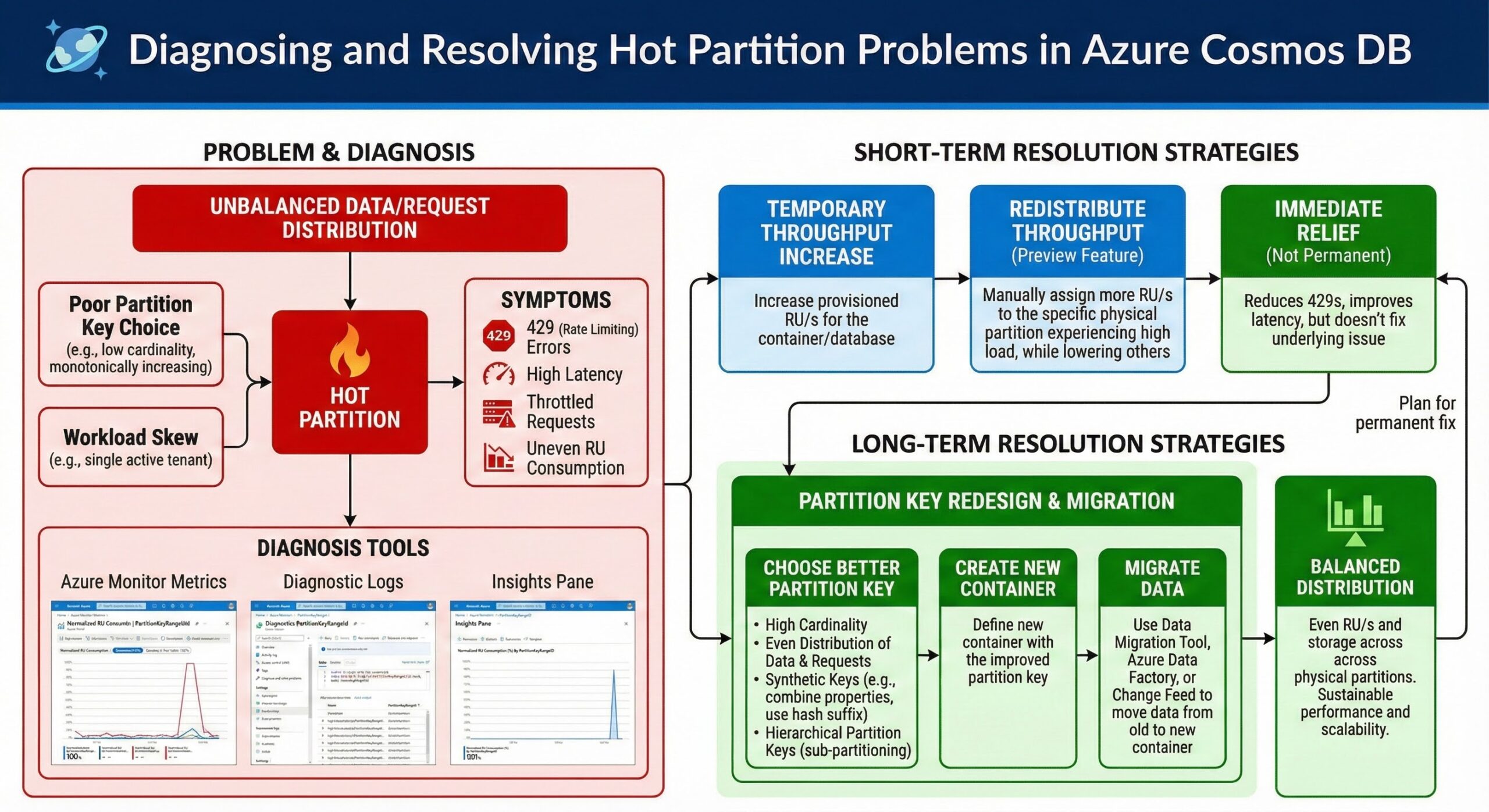
What Are Hot Partitions?
In Cosmos DB, data is distributed across partitions based on a partition key. Each logical partition hosts data items sharing the same partition key value, and each physical partition (or partition range) can host multiple logical partitions. Throughput (measured in RUs) is allocated across these physical partitions.
A hot partition occurs when a single logical partition receives significantly more read/write requests than others, causing it to consume a disproportionate amount of the total RU/s allocated to its physical partition. Since throughput is not shared across physical partitions, this leads to throttling on the hot partition while other partitions remain underutilized.
For example, if a container has 10,000 RU/s provisioned across 10 physical partitions (averaging 1,000 RU/s per partition), but one physical partition hosts a hot logical partition consuming 1,500 RU/s, that partition will be throttled—even though the total container throughput is underutilized.
Why Hot Partitions Matter
Hot partitions directly impact application reliability and user experience:
- Throttling (429 Errors): Requests to the hot partition are rate-limited, leading to failed operations.
- Increased Latency: Even non-throttled requests may experience higher latency due to resource contention.
- Wasted Provisioned Throughput: Overall RU/s may appear underutilized, but performance suffers due to skew.
- Scalability Limits: The system cannot scale out effectively if workload distribution remains imbalanced.
These issues are particularly problematic in mission-critical applications such as e-commerce platforms, real-time analytics, and multi-tenant SaaS systems.
Identifying Hot Partitions in Cosmos DB
Cosmos DB provides telemetry and metrics through Azure Monitor to help identify hot partitions. The most effective method is analyzing the “Normalized RU Consumption by PartitionKeyRangeID” metric.
Using Normalized RU Consumption by PartitionKeyRangeID
This metric shows the percentage of total RU/s consumed by each physical partition (identified by PartitionKeyRangeID) over a given time window. A uniform distribution would show each partition consuming roughly 1/N of total throughput (where N is the number of physical partitions). A skewed distribution—with one or two partitions consistently consuming significantly more—indicates hot partitions.
To access this metric:
- Navigate to your Cosmos DB account in the Azure portal.
- Go to Metrics under Monitoring.
- Select the metric namespace Cosmos DB Standard Metrics.
- Choose the metric Normalized RU Consumption.
- Set the aggregation to Max and group by PartitionKeyRangeID.
- Analyze the chart over time to identify consistent outliers.
Additionally, you can correlate this with the Request Units Consumed metric grouped by Partition Key to pinpoint specific logical partitions driving the load.
Monitoring with Diagnostic Logs
Enable diagnostic settings to stream logs to Log Analytics, where you can run Kusto queries to identify top partition keys by RU consumption:
CDBPartitionKeyRUConsumption
| where TimeGenerated > ago(1h)
| summarize totalRU = sum(todouble(RequestCharge)) by PartitionKey, PartitionKeyRangeId
| top 10 by totalRU desc
This query reveals which partition keys are consuming the most RUs, helping you trace the root cause.
Common Causes of Hot Partitions
Understanding the root causes of hot partitions is essential for effective remediation. Common scenarios include:
1. Poor Partition Key Design
The most frequent cause is a poorly chosen partition key that leads to uneven data distribution or access patterns. For example:
- Using a boolean field (e.g., isActive) as a partition key results in only two partitions.
- Using a timestamp or date as a partition key can lead to “time-series hotspots” where recent data receives most writes.
- Using a low-cardinality field (e.g., region, status) limits the number of possible partitions.
2. Skewed Workloads in Multi-Tenant Applications
In SaaS applications, a single tenant may dominate usage. For instance, if tenant IDs are used as partition keys, a large enterprise customer may generate significantly more requests than smaller tenants, turning their partition into a hotspot.
3. Hotspotting on Popular Items
Certain data items—such as a trending product, a celebrity profile, or a system-wide configuration—may receive disproportionately high read or write traffic. If these items reside in the same logical partition, they can cause hotspots.
4. Bursty or Seasonal Traffic
Applications with bursty workloads (e.g., flash sales, event registrations) may temporarily overload specific partitions, especially if the traffic targets a single partition key.
Remediation Strategies for Hot Partitions
Resolving hot partitions requires a combination of architectural changes, operational adjustments, and monitoring improvements.
1. Redesign the Partition Key
The most effective long-term solution is to choose a high-cardinality, uniformly distributed partition key that aligns with access patterns.
Best Practices for Partition Key Selection:
- High Cardinality: Choose a field with many distinct values (e.g., user ID, device ID, order ID).
- Even Distribution: Avoid fields with skewed distributions (e.g., country codes where one country dominates).
- Query Efficiency: Ensure common queries can be scoped to a single partition.
- Avoid Monotonically Increasing Values: Timestamps or auto-incrementing IDs can cause write hotspots.
Example: In a retail app, instead of using StoreId as a partition key (which may have uneven activity), consider using CustomerId or a composite key like CustomerId + OrderDate to distribute load.
2. Use Synthetic Partition Keys
When natural keys lead to skew, synthetic partition keys can help distribute load. This involves appending a suffix to the original key to create multiple logical partitions for the same entity.
For example, if a tenant generates too much traffic, you can shard their data across multiple partitions:
Original: /tenantId
Synthetic: /tenantId_0, /tenantId_1, /tenantId_2
When writing data, randomly or round-robin assign to one of the N synthetic keys. When reading, you may need to query multiple partitions—but this trade-off can be acceptable for high-traffic tenants.
3. Implement Workload Shaping and Caching
Reduce direct database load through:
- Caching: Use Azure Cache for Redis to serve frequent reads, especially for popular items.
- Write Buffering: Queue high-volume writes (e.g., using Azure Queue Storage or Event Hubs) and process them asynchronously to smooth out bursts.
- Rate Limiting: Apply client-side throttling for abusive workloads.
4. Isolate High-Volume Tenants
In multi-tenant systems, consider moving large tenants to dedicated containers or databases. This isolates their throughput and prevents them from impacting other tenants.
While this increases management complexity, it ensures predictable performance and enables tenant-specific scaling.
5. Leverage Autoscale and Reserved Capacity
Enable autoscale on containers to automatically increase throughput during traffic spikes. Autoscale can mitigate temporary hotspots by scaling up RU/s, though it does not fix underlying distribution issues.
Additionally, reserved capacity can reduce costs for predictable workloads, but it should be combined with balanced partitioning to avoid wasted spend.
6. Monitor and Alert on Partition Skew
Proactively detect hot partitions by setting up alerts on the Normalized RU Consumptionmetric. For example, create an alert when any PartitionKeyRangeID consistently exceeds 1.5x the average RU consumption.
Use Azure Monitor Workbooks to build dashboards that visualize partition utilization and identify trends over time.
Case Study: Resolving Hot Partitions in a Multi-Tenant SaaS Platform
Consider a SaaS application serving hundreds of tenants, each isolated by a tenantIdpartition key. Over time, one enterprise tenant grows rapidly, generating 80% of the write traffic. Monitoring shows one PartitionKeyRangeID consuming 70% of total RUs, leading to frequent 429 errors.
Resolution Steps Taken:
- Diagnosis: Used Azure Monitor to confirm the hot PartitionKeyRangeID and linked it to the large tenant’s tenantId.
- Short-Term Fix: Increased container throughput temporarily to reduce throttling.
- Long-Term Fix: Redesigned the data model to use a synthetic key: /tenantId_shardN, distributing the tenant’s data across four logical partitions.
- Application Update: Modified write logic to distribute new items across shards using round-robin, and updated read queries to target specific shards when possible.
- Monitoring: Implemented alerts to detect future skew.
Post-implementation, RU consumption became evenly distributed, and 429 errors dropped to near zero.
Best Practices Summary
To prevent and resolve hot partitions, follow these best practices:
| Practice | Description |
|---|---|
| Choose High-Cardinality Keys | Use fields with many distinct values to ensure even distribution. |
| Avoid Hotspotting Patterns | Do not use timestamps, monotonically increasing IDs, or low-cardinality fields as partition keys. |
| Monitor Partition Utilization | Regularly review Normalized RU Consumption by PartitionKeyRangeID. |
| Use Synthetic Keys When Needed | Shard high-volume entities across multiple logical partitions. |
| Leverage Caching | Offload frequent reads from Cosmos DB using Redis or in-memory caches. |
| Isolate Noisy Neighbors | Move high-traffic tenants or workloads to dedicated containers. |
| Design for Scalability | Anticipate growth and design partitioning strategies accordingly. |
Conclusion
Hot partitions are a common but solvable challenge in Azure Cosmos DB deployments. By understanding how data and throughput are distributed across partitions, leveraging monitoring tools like Normalized RU Consumption by PartitionKeyRangeID, and applying strategic remediation techniques—from partition key redesign to synthetic sharding and tenant isolation—developers can ensure balanced workloads, optimal performance, and cost-effective scaling.
Proactive monitoring, thoughtful data modeling, and iterative optimization are key to maintaining a healthy Cosmos DB environment. As your application evolves, regularly revisit your partitioning strategy to accommodate changing access patterns and growth.
By addressing hot partitions early and systematically, you can unlock the full potential of Cosmos DB’s scalability and deliver a reliable, high-performance experience for your users.
Further Reading
- MinervaDB Consultative Support for Azure Cosmos DB
- Cloud DBA Services from MinervaDB
- PostgreSQL 18 Performance Tuning
- Leveraging Snowflake Optima for Intelligent Workload Optimization
- Deep Dive into RocksDB’s LSM-Tree Architecture
- ChistaDATA University